Just wanted to note that you DO get a large (measurable) performance increase using NVMe natively via the Pi's PCIe bus vs. through a USB 3.0 adapter; see my notes in my Compute Module 4 review: https://www.jeffgeerling.com/blog/2020/raspberry-pi-compute-...
I should probably dedicate a post and video to NVMe support, but basically you get double the random IO numbers if using NVMe vs NVMe-via-USB3. You can't boot off internal NVMe though, at least not natively with no microSD card or eMMC volume.
Thanks for the write up. That was enlightening. PCIe is a really nice "bus" all things considered. At DSSD we liked it so much that we ran it directly to clients, over custom cables & connectors.
Up to 2 m over copper, longer over active optical. Why? Because of insanely low latency and very high bandwidth (PCIe gen 3 x4 in 2010!). No kernel involvement, app direct to storage. Way ahead of the time.
Looking forward to getting my hands on one :-) Next time you speak to the RPi folks, feel free to name-drop. Getting into the "RPi alpha tester club" would be very helpful for writing tutorials like this.
One needs to login to read. I'm sorry, medium is not a very charitable blog host, and will cost the blog a large part of its audience with these new rules, unfortunately.
I'm getting pretty irritated that the Web is inundated with Medium. It used to be just a nice blog host, and now I don't even know what it is. Glad Substack is picking up steam.
How is substack today different from Medium a few years ago? More importantly, what's different about their incentives that will prevent them from becoming what Medium is today?
Not if Javascript is disabled. No need for cookies either.
Alternatively, blocking cdn.client.medium.com where the Javascript is sourced in Developer Tools or via ad blocker, /etc/hosts, DNS, etc. will work, too.
There's a lot of countermeasures listed here in the responses, including this. :)
Good to know but the default experience matters. I have a beef here and I want the author to know that they need to switch blog host if they want their articles to be out on the open web and not behind logins or whatever.
I was careful to only quote the first sentence of the comment. I understand and agree with the point being made in the remainder of the comment.
I also think the "default experience" matters in terms of web browsers. Why do they all default to Javascript and cookies enabled. In this case, and there are hundreds of thousands of others, neither was technically necessary to read the blog.
Some of the images do not load when Javascript is disabled because the web developer has chosen to include three different-sized copies of the same image and use Javascript to emulate a "zoom" effect.
Note you can still zoom on these images. Right-click and open the image in a new tab, then zoom. Or you can open the larger versions in a browser tab and then zoom. The full URLs for all different-sized copies of images can be seen with view source.
I am looking forward to a future where PCIe devices might be connected too. I would really appreciate it if someone other than Intel would kindly please start doing Thunderbolt. Now that USB4 is official, adding PCIe connectivity would be a very good perk for these next generation systems. So far though no one has registered interest. Please can someone other than Intel & Apple prioritize better connectivity? AMD? MediaTek? Qualcomm? Anyone?
There's two modest perks to NVMe over SATA. First, the drives tend to be faster. For large reads/writes, this probably wont help, as you'll be bus limited to USB3 speeds. But for smaller reads & writes, the NVMe drive can maybe probably do more iops, and you may see wins & better latency on workloads. NVMe also has a bunch of under the hood improvements. There's a quite in depth comparison of the two[1]. Larger queues, multiple queues, less round trips to issue commands, better completion model. I am very much unsure of how many of these advantages are exposed & would carry over when the host-to-device connection is still UAS based, which is what adapters like the one in this article still feature, same as if it were SATA. But some of these wins will help latency & iops again vs a SATA drive.
Many AMD enthusiast motherboards ship with Thunderbolt.
It's a straightforward technology to implement and I believe it is now royalty free. The only implementations are Intel's though and I'm sure they're expensive.
Expansion is a complicated business model. Apple doesn't even ship headphone ports. The AirPods are smash hit, not least because when you sell a $1,100 device a $100 accessory suddenly seems really well priced. PCs are similarly pretty high ticket items, that market supports a situation where spending $100 on custom internal PSU cabling is not that bad.
The Raspberry Pi is tough. Accessories cost more than 2x the device. It's a model that doesn't really make sense. You could say that people are buying these accessories, but really its greatest limiting factor is that it's too cheap, it's hard to psychologically deliver on the big ticket item + accessories shopping cart for it.
Intel has Thunderbolt integrated onto their CPU, which seems natural & like what I would want in the future from everyone.
Current Intel host-adapters seem to be ~$10 for the dual-port chip itself[1] (JHL8540). Not sure how much else it adds to the bill-of-material beyond a regular USB port! Adding it direct to the CPU would be a wonderful way to save space, & significantly reduce how hard it is to implement, since one would no longer need to route USB and PCIe and power to this extra chip.
I wouldn't expect Thunderbolt support on the low end for a long time. But I really do think it's really time that cpu makers begin offering it onboard. They already need to start moving towards USB4. Adding PCIe as well would be a courtesy, & a big enabler, for their customers. Hopefully we see these great awesome futures begin arriving in a more well-distributed manner.
Intel's reference designs for thunderbolt are behind NDAs so it's a pain in the ass to implement on a PCB and I don't think the controllers themselves (or their datasheets) are easily sourceable either. The Pi foundation has probably got the pull to do it but it would take quite a bit of effort since it would make the Pi an easily available competing reference design, possibly running into internal politics at Intel.
I don't see how a Pi can take advantage of NVMe. From my tests using a 10Gbit USB3 adapter with a capable NVMe drive (3GB/s), its impressive IOPs are reduced so much that they are almost comparable to a 'normal' SATA. I would expect a 5Gbit USB to further limit it.
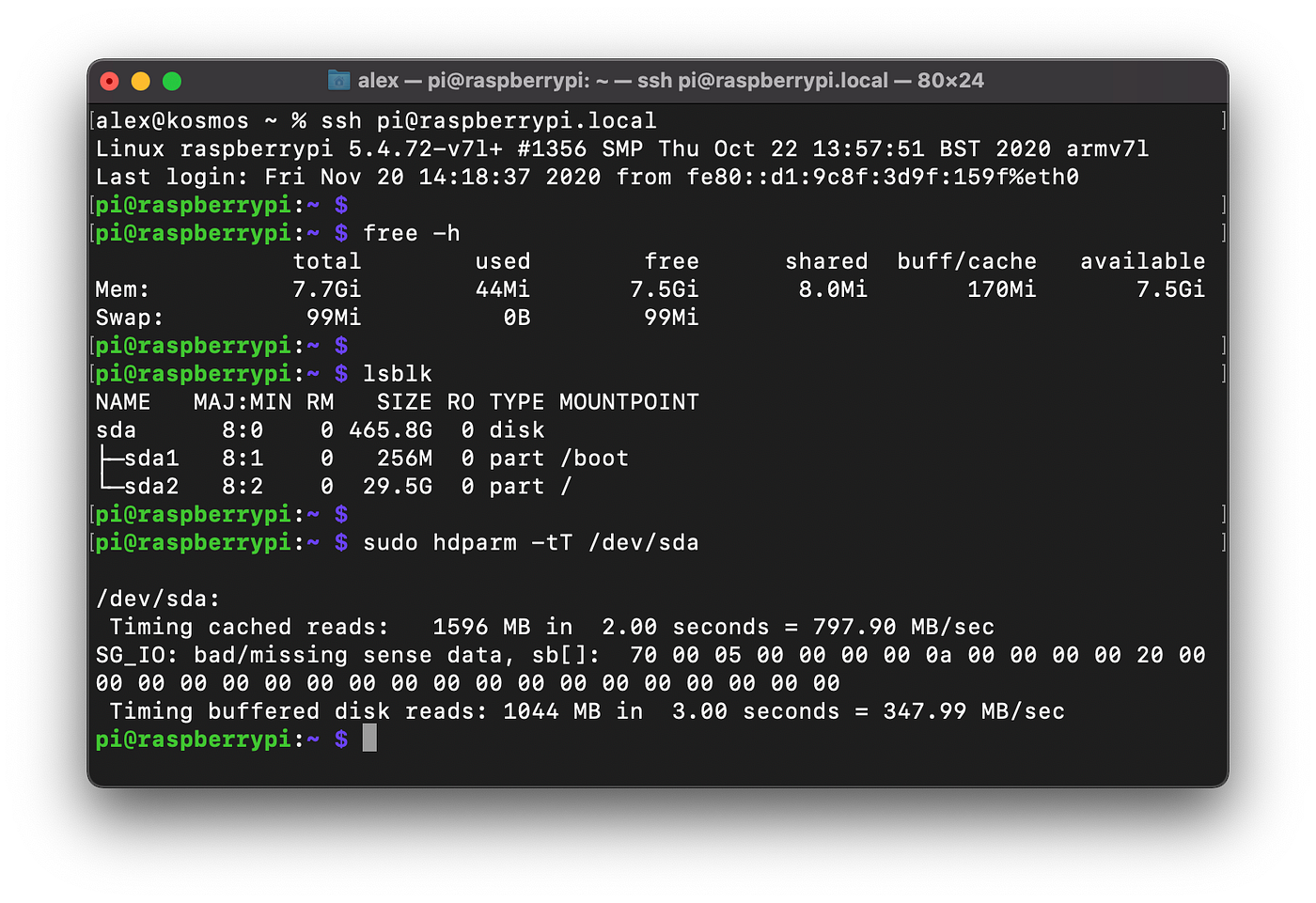
I have a “normal” SATA SSD plugged in, and it’s running within 10% of the hdparm benchmark in the article (it’s not a 1:1 comparison since it’s an older SSD, cheap adapter, and I have two other HDDs plugged in via USB for bulk storage). At that speed, with those other variables, I think it’s the USB port that’s the bottleneck.
This part is strange:
"NVMe drive — an M.2 SSD looks almost identical, but has two notches instead of one. Generally an SSD will perform to the tune of hundreds of MB/s instead of thousands."
First, both are SSDs, so I don't know what he is trying to compare. Both use M.2, but different keys from the sounds of it (the "notches").
M.2 drives can be either SATA or NVME, but it is harder to come across a SATA M.2 drive than an NVME drive these days, so I'm having trouble seeing the point.
For what it’s worth, unless you’re somehow able to dedicate a PCI-E lane to a USB port, the USB spec will be what limits you. I switched a Pi4 to boot from an older, spare USB SATA SSD a few weeks ago, and it’s reporting 1566MB/924MB on the same hdparm tests as the article (about a 10% drop-off).
Often, most parts will just plain fail to fit, and fit exactly one way.
But the keys for the different type of M.2 slots are not large enough on M.2 SATA vs M.2 SSD to prevent them from mixing up. It's easy to force, and forcing it will be fatal for the device.
I know this from an expensive lesson I learned, long ago :(
A M.2 SATA SSD will fit into any socket designed for M.2 SATA or M.2 PCIe SSDs, without damage. A M.2 PCIe SSD that only uses two PCIe lanes will fit into any socket designed for M.2 SATA or M.2 PCIe SSDs, without damage.
The only way to run into trouble is to force a M.2 PCIe SSD keyed for four lanes of PCIe into a M.2 socket keyed for SATA only with no PCIe lanes. Forcing this requires you to install the drive upside down and overcome the 0.5mm misalignment of the 1.2mm wide notch in the drive (meant to be filled by a 1.1mm key in the slot).
If you merely install a SATA SSD in a slot only wired for PCIe, or a PCIe x2 SSD into a slot only wired for SATA, the drive will fail to work but nothing will be damaged.
(You could theoretically also end up in trouble by forcing a SATA or PCIe x2 M.2 SSD into an appropriate slot, but upside down. However, this requires considerably more stupidity on the part of the user because in this scenario the SSD has two notches in the connector, so it is fairly obvious that any mechanical difficulty with installation could be due to having the card upside down. When installing a drive with only one notch, it's less obvious that the difficulty arises from a fundamental and intentional incompatibility.)
(Whatever I did; it let out the magic smoke, and the M.2 device was visibly scorched. The 2nd time I ordered the same part and very carefully examined the keying did I realize my error...)
And likely even a Pi4 couldn't take full advantage of an NVME drive except in specific workloads or setups. I'd use a SATA M.2 if needed to save 40% of the cost on the same size SSD. Or just a random thumb drive I have around.
The Pi4 compute unit has a PCIe x1 slot, I think, and that could better put an NVME drive to use. But at that cost, for the drive and Pi, I don't see it being widely used outside of hobby or home use.
I'm excited about this and how the official Pi4 firmware now supports USB boot. Maybe if you used the Pi to run a NAS and wanted the NVME drive as accelerated cache (it can do H.265, 4kp60 decode, and H.264)?
But can a Pi even process an NVME drives bandwidth via it's CPU/etc or Gigabit Ethernet/USB 3.0/GPIO add on?
Edit: This guide is basically 1. Put SSD in adapter and 2. Set up USB boot then clone SD card to SSD. How is this article not just a forum post like the dozens of others that provide the same information and process?
> I'd use a SATA M.2 if needed to save 40% of the cost on the same size SSD. Or just a random thumb drive I have around.
There are now lots of low-end M.2 NVMe SSDs on the market, and M.2 SATA SSDs are becoming uncommon. So there's no price remaining price advantage for M.2 SATA over M.2 NVMe—certainly not 40%—and it is not uncommon to find M.2 NVMe sale prices that are better than any M.2 SATA SSD price, since the more popular NVMe SSDs get better and more frequent discounts than the niche M.2 SATA SSDs.
And the M.2 SSDs on the market with the lowest absolute cost (rather than per GB) are usually the Intel Optane Memory 16GB NVMe SSDs that were intended for use as cache devices, but have enough capacity for lots of embedded Linux use cases while also outperforming SATA SSDs of any capacity.
The USB is limiting this so much there is no need to go with NVME over SATA, IMHO.
I see the USB3 result for the "M.2 SSD" (I assume the author means SATA?) being ~30/MB but almost surely something is going wrong there. That is not a normal result for any mid-to-high level SATA SSD. Plenty of SATA M.2 SSDs can easily hit the same speeds the NVME drive is hitting (specifically when on USB3). NVME might give you some additional random r/w performance, however.
It seems like overkill to use NVME on USB 3.0 when SATA can saturate that bus just as easily. SATA M.2 drives will also run cooler. Some NVME USB controllers are notoriously hot-running
It very much depends on the particular drive, with both controller and NAND choice affecting power draw and efficiency.
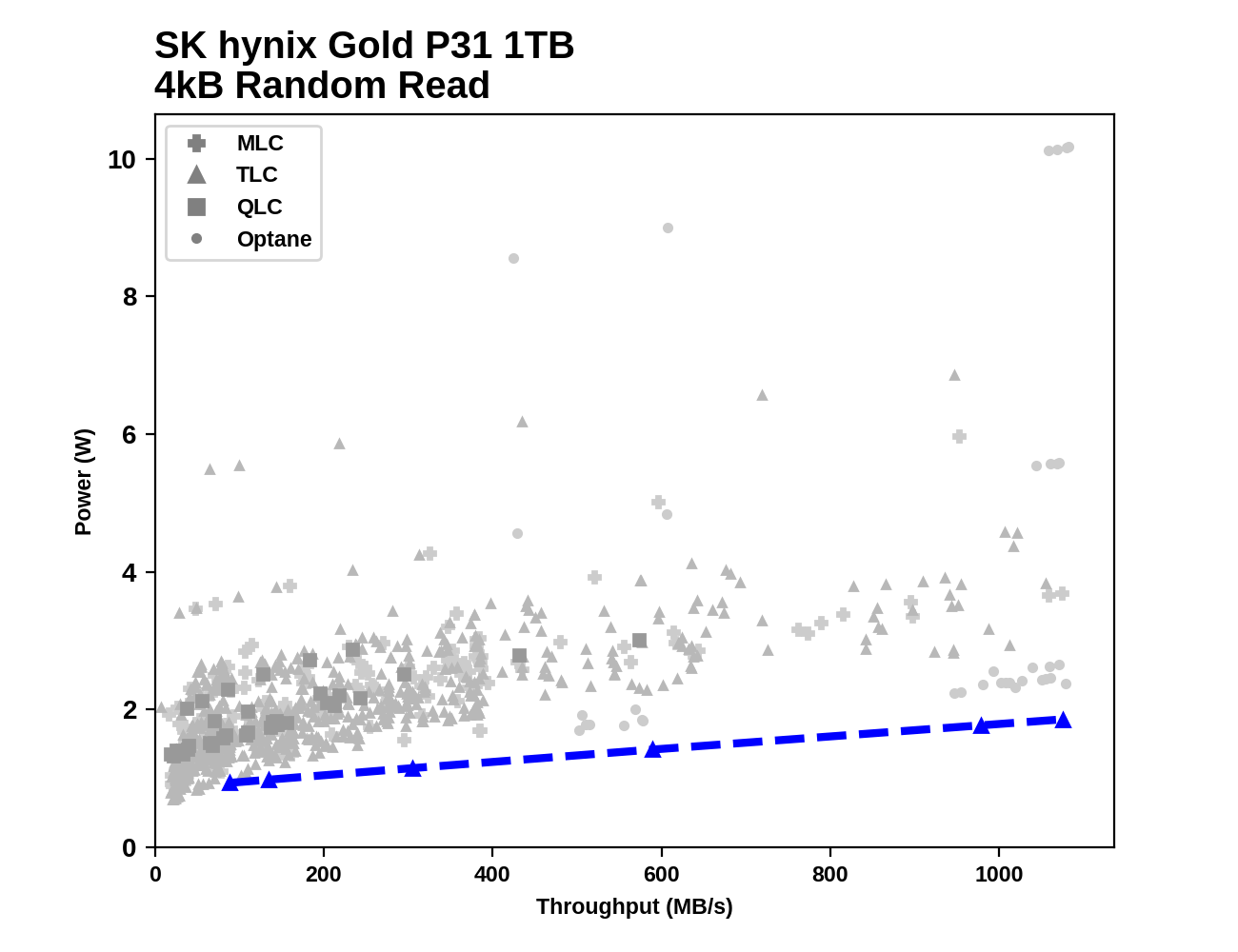
On a performance per Watt basis, most M.2 NVMe SSDs are much more efficient than M.2 SATA SSDs. The most efficient M.2 NVMe SSDs are also at least competitive with M.2 SATA SSDs in terms of absolute power consumption, despite outperforming the SATA SSDs by at least a factor of 2-3x. Power consumption from a M.2 NVMe SSD will also drop slightly when only one or two of its four PCIe lanes are used, which is the case when the drive is behind a USB to NVMe bridge.
For example, comparing a SK hynix NVMe drive against of dozens of other M.2 NVMe and 2.5" SATA drives: https://images.anandtech.com/doci/16012/rr-all.png Unfortunately, I don't think there are any M.2 SATA results in there, and those are often a little bit more efficient than their 2.5" counterparts (running off 3.3V rather than 5V, but stepping it down to at least one or two lower voltages on the drive in either case).
Generally speaking you can choose either power efficiency or a wide bus, but rarely both. If you want a crappy underpowered m.2 slot, probably Intel Atom is the cheapest route.
High performance ARM with m.2 PCI, not sure, but guessing if it's around it probably isn't cheap
A single PCIe lane can draw 0.5 A, 4x rises to 2 A.
Separately, (random top Google result cutpaste):
    Architectural-level power optimization can target different system
    components such as CPU, caches, main memory,and buses [5, 6, 22, 4]. Power
    spent in off-chip buses can be a significant portion of the overall power
    budget. As an example, the core power consumption of Intel Celeron at
    266MHz is 16W, while its off-chip bus (for a standard configuration)
    operating at 133 MHz consumes 3.3W [12, 13]. The contribution of off-chip
    bus power consumption to the overall power budget increases even more for
    embedded systems with low-power processor cores and memories, making
    off-chip  buses  a  potential  candidate  for  power  optimization. Figure
    1 shows the power consumption due to off-chip data bus for several embedded
    benchmark codes as a percentage of the overall power consumption (which
    includes processor data path, caches, buses, TLB, register file,
    instruction issue logic, clock, and off-chip memory) for an
    embedded processor.  From this figure, we see that the off-chip data bus
    consumes between 9.8% and 23.2% of the total power consumed by the system
    depending on the benchmark being run. So, reducing the power consumption
    of the off-chip data bus would reduce the overall power consumption of
    the system to a considerable extent
Yeah, that makes sense. I wouldn't expect the same price point as an RPi and would love a higher performance CPU, but I think they are not out there at the moment. Wouldn't mind having something like 8 graviton2 cores and an nvme slot :)
Honestly I'd get rid of the USB and use the Pi 4 compute module with NVMe next year.
USB connectors suck balls, one bump or connector dangling over the edge of your desk that gets hit by a hip and you have a device reenumeration, no idea what havoc that would have on the kernel that's running off it.
USB is evil. Never use it for anything mission critical.
> one bump or connector dangling over the edge of your desk that gets hit by a hip and you have a device reenumeration
It’s fun to think about the horrors which might result with similar mistreatment of old school external SCSI hardware. USB is fine; use quality cables and don’t run your computer in a disco if you can help it.
USB cables are some of the worst designed crap I have ever seen in the history of computing. When you plug the cable in, it doesn't make a firm, snug fit, and jiggles around in place. If you press down on it it can even torque the connector right off the PCB.
I often have to design 3D printed housing to go around the USB plug housing to hold and lock the plug snugly in place, because the designers of both the USB ports and plugs are incompetent at designing something industrial grade that locks down firmly.
SCSI cables were fine, their ports were secured to the housing and they had nice screw locks so the cables wouldn't go anywhere. Any cantilever forces were absorbed by metal casing, not PCB. Super reliable.
I don't want to defend USB too heavily (as you say, it is certainly not "industrial grade," but I don't know what the equivalent of something simple and very strong like a Hubbell twist-lock connector would be in data transfer terms, and that's something to contemplate) but this really shouldn't happen with any halfway decent cables or hardware. It doesn't apply to the Raspberry Pi 4 in my experience, or any of my laptops or PCs. Phones and micro-USB are, of course, a special case and uniquely horrible.
> SCSI cables were fine
Except when they weren't, and then you'd have to spend fifty bucks (whatever that equals in 2020 dollars) to test and see if the cable was what was failing you, or the termination, or the jumper settings...
> but this really shouldn't happen with any halfway decent cables or hardware
Well, the best brand cables jiggle around. I'm talking Pi's, Macbooks, Pixel phones, you name it, they all jiggle around.
I've had RealSense cameras, StarTech USB hubs fail because of cable jiggling around in the port, and had to make 3D printed add-ons to grip the housing and prevent cable jiggling.
I've personally had WAY more problems with USB that SCSI cables, honestly. Also I break an average of about 1 USB cable a week; SCSI, DB25, DB9, DB15, BNC, and those cables never break.
BNC has always been trouble-free for you? That's interesting.
I think the only cable type that was entirely trouble-free for me over the years was the parallel printer cable with the truly awful Centronics connector. I don't remember ever throwing one of those away. Of course, that's not a cable that you'd plug and unplug much, which certainly helps.
Depending on what you want to do you can get good results using tmpfs ram disk in combination with a non volatile USB plugged storage.
Eg: I convert some RTSP stream from a pi zero to HLS on a pi4 by ffmpegging the RTSP stream to HLS files in the RAM disk. I use bindfs to make this mountpoint available as a www-data folder in /home/pi/ssd/web/hls (which is actually on an USB plugged SSD) for HTML viewing in the browser. Motion triggers events, those events can be recorded from the RTSP stream or the ramdisk (holding HLS files) to the attached SSD. The HLS conversion adds a 30 second buffer so any triggers on the RTSP stream has an hls capture starting 30 seconds before the event and the SD card is never touched and I could use a spinning disk, it wouldn't be a bottleneck (but I am somehow more confident the SSD will be more stable power wise).
These sorts of posts come up often and I cringe every time I see dongle attached storage. An unnecessary additional failure point seems counterproductive.
I have a Raspberry Pi and I use an SD card because what I’m using it for doesn’t require anything more. If you need fast storage I believe you should buy an appropriate device and maybe petition the Foundation to add it in a future model.
> I cringe every time I see dongle attached storage
I'm quite curious as to how this is "cringe"worthy. I can certainly see how mechanically stable attached storage is preferable in a lot of situations, but people use Pi's for a vast array of uses, and I cannot imagine that every use case, or even a significant majority of them should be barred from USB attached storage.
FWIW I have not had any SD corruption issues after 1) using name-branded cards and 2) ensuring that I feed each Pi w/5.2V. In the end I bought a commercial 5V power supply, tweaked it up 5% and wired directly to the 5V pins on the Pi.
I'm running several Pi's from SD card, some for years, and the only issue I had was with one that randomly crashed.
Measured the resistance of the "USB charging cable" I had used for it and found it was 1 Ohm! So when the Pi peaked at 1A current draw, the cable dropped 1V.
Swapped it out for something proper (<0.1 Ohm), and haven't had issues since.
Presumably using an enterprise-grade NVMe SSD with power loss protection capacitors would avoid such trouble. Some of those have reasonably low power consumption under load, but they're all bad at idle compared to client/consumer SSDs. But now you also have me wondering about Intel's Optane cache SSD modules, which like enterprise SSDs don't have any volatile caching, and they're also cheap enough to make some sense in an RPi context. I'm tempted to do some voltage margin testing on one to see where it browns out compared to a typical consumer SSD.
I disagree. The RPi is a pretty versatile little machine. Yes, it does have some limitations, and the workarounds for those (like NVMe-over-USB) are not particularly optimal, but by sticking with RPi (rather than one of the other myriad SBCs), you get consistency and a reasonable expectation that the board is still going to be supported with an up-to-date userland 10 years from now.
I've been wanting to build a 4-bay SBC NAS for years now, but I haven't been able to bring myself to trust the community and support for some of the other boards that do give you direct access to the PCIe bus so you can actually get decent performance.
Now I'm waiting for someone to come up with something based on the Compute Module 4... (There was a post about someone designing a PCB for something that would do the trick the other day, but it requires some 0.4mm pitch soldering skills that I just don't have the equipment for.)
>"...I cringe every time I see dongle attached storage..."
>"...If you need fast storage I believe you should buy an appropriate device"
Frankly you can cringe all you want but it is really up to the owner to decide how they use their hardware. Your opinion about it is irrelevant as people have their unique situation and are quite capable to weigh all pros and cons of whatever they decide to do.
Does nvme actually mean anything here over m.2/sata? Is the Pi able to really use all that bandwidth?
Also, plugging in the NVME over USB3 makes them show up as /dev/sdx devices (not /dev/nvme0x)? Is USB3 still allowing a PCI bus lane connection? I thought you needed a thunderbolt connect for that.
Another neat trick is to use the 8GB Raspberry Pi 4 and load the whole OS into the RAM at boot time. This makes booting take much longer but after that the system runs very fast and responsive.
Of course eventually the logs will eat everything to you have to write back to USB or SD from time to time.
Author may have gotten lucky in their Western Digital Blue SN550 selection. It's a fairly low power drive. WD has been making their own controllers, & they have a history of being fairly power friendly. This is a very new drive too. This review[1] shows it using 2.62 watts during a large file copy and on-idling at 0.96 watts.
The best drive shown is a Crucial MX500, using 2.32 watts during cpy and 0.52 watts at on-idle.
There will be some additional power consumption from the usb adapter too but i'd expect no more than 0.2 watts.


I should probably dedicate a post and video to NVMe support, but basically you get double the random IO numbers if using NVMe vs NVMe-via-USB3. You can't boot off internal NVMe though, at least not natively with no microSD card or eMMC volume.